Gemini Double Exposure Ai Prompts – Today’s article is going to be very special for those who are interested in photo editing with AI because at present some photos made by AI are becoming very viral on social media. Which people are knowing as double exposure or dual photo editing. In which we saw that people use their selfie photos in Gemini to create that kind of photo in which they create an artistic image by blending multiple images together. Even before this, we have given a prompt to do that kind of photo editing on this website in which we had told about making that kind of photo using chatgpt, but at this time some different kind of photo is going viral which everyone is making using gemini. We first created some double exposure photos using our own selfie photos and shared them on our Instagram ID and you won’t believe that every photo got so many likes, don’t even ask, this shows how much people are interested in doing that kind of photo editing. In this article we will prompt every type of double exposure photo made by Gemini.
About The Picture Created From The Gemini Prompts
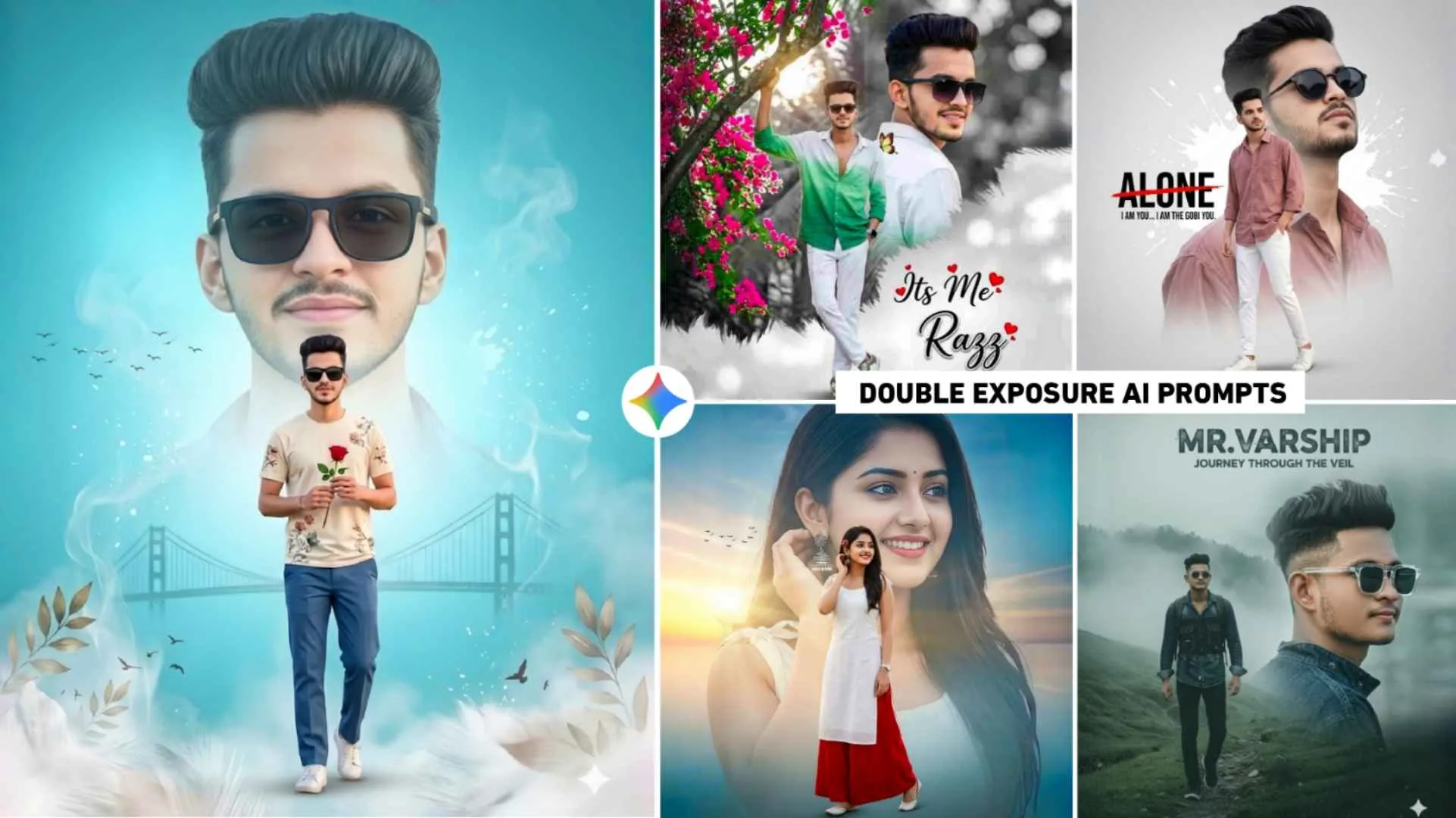
Who are currently seeing the photo with double exposure in the thumbnail. Earlier, people were making that kind of photos manually using apps like PicsArt, Lightroom, Snapseed. But now most of the people are using AI tools instead of editing the logs manually. Now whatever type of photo you see on Instagram, people are able to generate professional-looking images just by writing a simple prompt on platforms like Gemini. When you create a picture using your selfie photo on the ground by copying the formula shared in this article, your photo can become something like this, the first photo that will be created will be on Sunrise/Bridge theme in which a big portrait face will be there and at the back a bridge and sunrise scene will be shown. The use of orange and white tones makes it quite “bright”. There will also be udte huye parindey at the bottom in that picture. If we talk about the background, it will be a branch with pink flowers. Which is giving a frame to the photo. The boy is wearing green and white shade shirt, white jeans and stylish sunglasses.
The boy’s name will be written in this picture. Which is the third prompt. It is for a girl with a big face portrait of her looking at the sunset and the ocean shore. She will be wearing white kurti and red palazzo. In that photo, there is a lot of lighting falling on the girl’s face. The birds flying in the background give a peaceful feeling. Here, we share many photo prompts to help you get ideas.
Improve Your photos Quality With An Editing App
I have seen this thing often. Most of the people create photos with gemni and save the photo and share it directly on Instagram. It is not right to do this as you will see. Whenever a photo is taken with Gemini, a small image of Gemini is seen in the bottom right corner. That’s all I mean to say. If you edit the photo created by gemni a little using the editing app, the photo will look even more beautiful. In which first we have to do this, we have to remove the people coming from Gemini. Second, color grading will have to be done properly in the photo and third, the quality of the photo will have to be increased. That means it will have to be made in HD. All this can be done very easily using Lightroom and PicsArt photo editing app, in which you can remove the Gemini people inside Lightroom itself. Can also do color grading. To make it in HD, you can use Ai Enhance Tool in PicsArt app. Also, by using the sticker tool, you can add whatever kind of PNG you want to the photo from there.
Gemini Double Exposure Ai Prompts


Double Exposure Ai Prompts


How To Use Gemini Double Exposure Ai Prompts?
“I have seen all the prompts with photos, so it is much easier to create photos using them. First, just keep a good selfie photo of yours ready in which the face is clearly visible. After that go to paragraph four. Look at all types of photos carefully first. If you want to make a photo for a boy, then copy the prompt of the photo of the boy. You can copy the prompt by holding and pressing. Once copied, install the Gemini app from Play Store and select the Create Image option so that Gemini feels like you are creating a photo because it has a lot of options. After selecting the create image option, click on the media option and upload the same selfie photo there and paste the copied prompt in the chat box and click on send option. Gemini will easily create your selfie photo in no time by following the prompts. After making the photo, click on your photo and save it. The face of some people often does not match in the photo, so for this you can try again by writing Hundred percent real face at the end of the prompt.
Does Gemini Benefit Content Creators?
Yes, with the advent of Gemini, content creators are benefiting a lot. I am saying this because earlier people used to spend hours to create YouTube thumbnails, now they can create any type of thumbnail in a short time by writing the prompt in Gemini. If people want to make any kind of picture then they can make it very easily through gemini. The hassle of clicking photos is over. Additionally, I have seen that many people use Gemini to create YouTube thumbnail covers and Instagram reel covers. For example, they easily design eye-catching visuals with it. The text written in it is completely bold which matches perfectly with your photo. If you want to get information about any video, you can get it very easily.