Diwali Ai Photo Prompt – Diwali, the festival of lights and happiness, is very close which is being celebrated on 9 November 2026 and even before Diwali arrives, many people are making and posting different types of photos related to Diwali on Instagram, whether it is a boy or a girl or a couple photo of a boy and a girl together. Recently we saw on Instagram and YouTube that people are creating and sharing different types of photos. Be it lighting a lamp, bursting crackers or celebrating Diwali. People are creating and sharing all kinds of AI photos through just one selfie photo. Because you must be aware that through artificial intelligence, we can now easily create a picture that looks exactly like the original. We just have to take a good photo of ourselves. That means reference photos and through them we can create many types of photos. Even if it is a couple photo. This Diwali, if you are also thinking of creating your own picture through AI, then today I will tell you. Moreover, learn how to create different styles of Diwali photos using just one selfie, and get stunning results with the right prompts.
In this article, prompts for making various types of photos on Diwali will be shared. By using which a very beautiful picture can be created. Apart from creating a picture with AI, how can we make that picture even better so that our picture looks different from everyone else. We will tell about this also.
Complete Detail Diwali Ai Photo Editing
Look, you must be knowing this. What are the main things people do on Diwali? Before Diwali, they clean their surroundings i.e. their house, put different types of lights on them, decorate them and on the day of Diwali, wear beautiful clothes and worship Goddess Lakshmi and Lord Ganesha. They light lamps together and celebrate happiness all around. People feed each other sweets and also burn crackers while celebrating. In this article we will mainly tell you about making photographs related to this. What I will do in this is, I will try to give you prompts with images so that after seeing them you can easily copy the prompt and create your favorite photo. When we create a picture with AI through prompt, sometimes our picture looks very blurry or in other words, it does not look good. The look of the photo is fine, but due to lack of color grading in it, the photo does not look a bit good. If this happens to you too, then you can take the help of Lightroom app. Finally, simply save your AI-generated photo and share it directly to the Lightroom app for further editing.
About Diwali Ai Photo To Video Editing
Yes, I have also seen a lot of Diwali videos on Instagram or you can say on social media which have been made by artificial intelligence in which people first do what they do, they create a photo as per their choice in which they create a similar picture of someone lighting a lamp or bursting crackers and then with the help of create video option given in artificial intelligence like Flow Ai and Gemini, upload that image and generate a video by putting a prompt there and then add something good related to Diwali in it. Let’s make the video by adding the song. If you also want to do this then what should you do first Make a photo using the prompt given by us and then make any video of that photo or you can upload it in Ai Tool and write the prompt as per your choice. After the video is made, mute its sound with the help of a video editing application and add a song to it because no song will be visible in the photo created by AI unless you add a song and upload it. The video will not look good.
Photo & Prompt Here
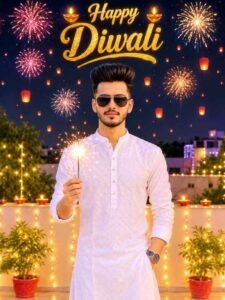
AI PROMPT
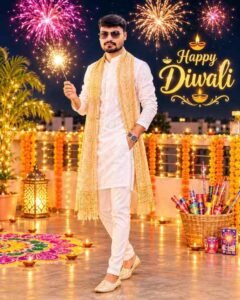
A stylish handsome young Indian man celebrating Diwali on a decorated rooftop at night. He is wearing an elegant white embroidered chikankari kurta, black sunglasses, and a wristwatch, holding a brightly sparkling phuljhadi in one hand with a confident, charming smile. The terrace is warmly lit with glowing clay diyas, fairy light strings, and potted plants. The night sky is vibrant with bursting colorful fireworks and glowing floating sky lanterns. Centered at the top, radiant golden 3D text reads “Happy Diwali” adorned with small lighted diyas. Cinematic portrait lighting, ultra-realistic details, festive ambiance, 8k resolution.
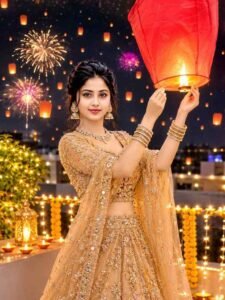
AI PROMPT
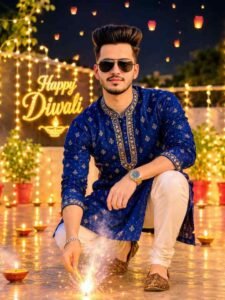
AI PROMPT
Diwali Ai Photo Prompt
AI PROMPT
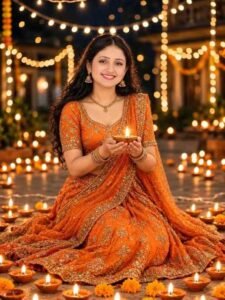
3:4 vertical photorealistic portrait of a smiling Indian woman sitting on a courtyard floor at night, wearing a vibrant orange embroidered lehenga. She is holding a lit diya in both hands, its warm glow illuminating her face. The background features hundreds of glowing diyas on the ground and twinkling warm string fairy lights, cinematic festive lighting, 8k resolution, highly detailed textures
AI PROMPT
AI PROMPT
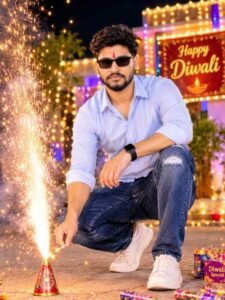
use the attached image as face reference, A Full-body, ul-tra-redlistic 8K cinematic por-trait of a handsome young man, 24 year old (face perfect-ly matching the uploaded ref-erence image), well stylish dark and slightly brown hair He is wearing sleek black sunglasses and a stylish black smartwatch. He is lighting vibrant Diwali fireworks (patakhe), sparks
Ai Photo Prompt
AI PROMPT
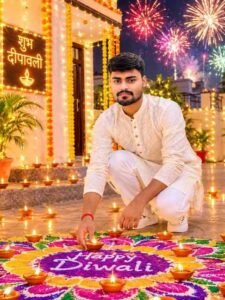
AI PROMPT
Create Diwali Ai Photo Using Chatgpt Prompt
It is very important to keep some things in mind before making a photo. Otherwise, the photo created by us does not look good, like the first thing is our reference video, the better the reference photo is, the better our photo will be. Sometimes, due to bad reference photo, the photo does not turn out correct even after inserting it correctly. Second, we have also shared the prompts because the better the prompt, the better the photo will turn out. Third Ai Tool: First you have to decide which ai tools you want to make photos because many ai tools are available which make photos through prompt. Like right now I am going to tell you about making photos through chatgpt.
- Install the Chatgpt app from the Google Play Store.
- Open the app and login with your Google account.
- Select the create image option shown on the screen.
- Add your good quality photos with the help of media option.
- Enter the prompt of your choice in the chat box.
- If you want to make any changes in the prompt, then make the changes and click on the send button.
- Wait until the photo is taken.
- After waiting for 1 minute, the photo will appear on the screen.
- Click on the photo and then click the save button at the top. The photo will be saved.
Final Thoughts
Do you also want to make this Diwali festival more spectacular with the help of artificial intelligence. Today’s article on Diwali Ai photo editing will be a very good option by making Ai photo because in this article we have told you about making different types of amazing photos on Diwali. We have also shared related Diwali ai photo prompt along with the Diwali photos. You can create many types of photos with just one photo. Not only this. Moreover, How can we make videos. We also provide information about this using Diwali photos. So try Prompt once and make this Diwali special with artificial intelligence.