Aesthetic Profile Picture Dp Editing Prompt – In today’s time, everyone definitely has their own social media ID. Be it Facebook, Instagram, WhatsApp or YouTube. To improve their profile ID, everyone puts different types of profile photos, also known as DP, in it. To improve their profile, many people create a good DP using various editing apps and then add it to their profile photo. But now there is no need to do this at all. Without using editing apps, we can now create amazing profile photos with the help of Ai. Recently we saw on Instagram that people are talking about creating different types of profile photos with the help of Ai, which is being known as Aesthetic Profile Photo Editing. So today’s article is related to this in which I will give you complete information about making the same Aesthetic DP. Let me tell you that people are using Ai tools like Chatgpt and Gemini to create such aesthetic profile DP photos. For which prompt is required, in this article we are giving the same prompt to make DP photo.
Detail Of Aesthetic Profile Picture Dp Editing
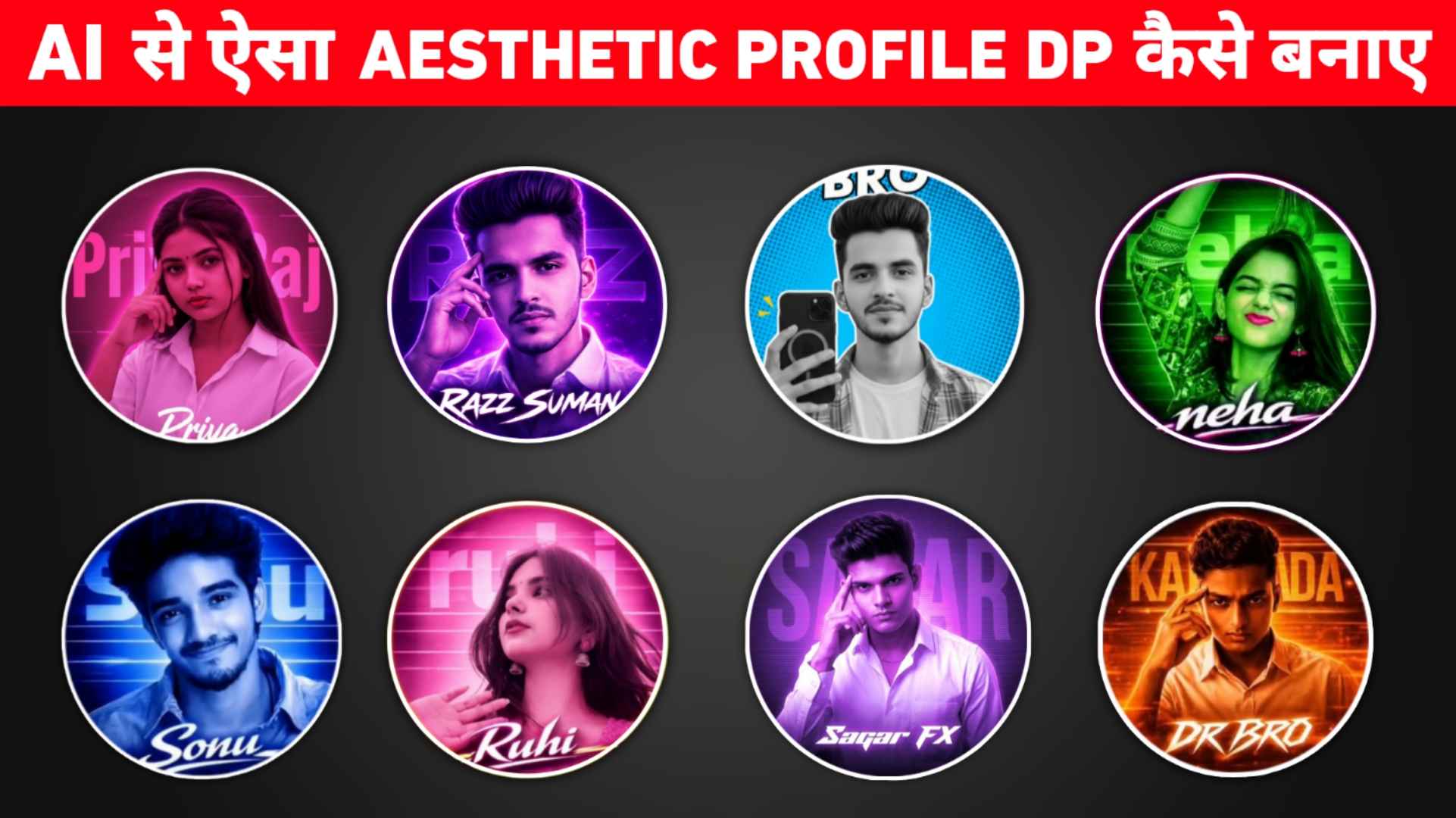
In the feature images that you might have seen in this article, we have included different types of profile DP photos. All of which are aesthetic looking. We have used different types of color backgrounds and text in all. Like a DP purple neon aesthetic, cinematic style circular one with sharp face lighting, glow effect and big name branding text at the back. In every DP you must have seen the face getting highlighted like sharp studio light and soft glow effect. We have given many types of prompts in this article. That too with profile photo so that it can be estimated. What kind of aesthetic dp can be created with which prompt? To create such aesthetic profile DP, you can use chatgpt or gemini, but we have seen that the best results are obtained from chatgpt only. Because chatgpt creates any type of photo in very HD and with a lot of detail. If you want, you can also create profile DP using gemini. The prompt we have given will work very well in both Ai tools. Be sure to write your name in place of Your Name in all prompts
Can Such Aesthetic Dp Be Create Manually
Yes, you can create such an aesthetic profile DP manually without the help of ai. But for this it is very important to have knowledge of good editing. Most people use photo editing apps like pixellab and PicsArt to create profile photos. Many people also use Photoshop. To create that kind of DP manual with your own photo, which is going viral on Instagram, first you will have to click a good photo of yourself. Then you should edit it properly with an editing app. After that, you will have to create a profile DP by adding it to editing apps like Pixellab and PicsArt. Doing manual editing like this may take a lot of time and will not be that good, but if you create such a DP with the help of prompt, it will be ready in a few minutes. To create Aesthetic profile DP from Ai, we just need a good selfie photo and a prompt. If you edit the created profile DP photo with an editing app, it will look even better.
Aesthetic Profile Picture Prompt




Make Aesthetic Profile Picture Using Chatgpt Prompt
Creating an aesthetic profile picture using chatgpt is giving very good results, so in this we are going to tell you how to create an aesthetic profile picture using chatgpt. It is very easy to create such a dp using prompt. You will have to do this much for this. First of all, you have to look carefully at all the profile pictures uploaded by us. After seeing whatever aesthetic profile picture is to be made, we have made different types of boxes and given prompts. Which has to be copied carefully and thoroughly. Next, after the copy is done, keep one of your photos ready. What do we have to do after the prompt and photo is ready? Then, let us know step by step.
- First of all, open the Chatgpt website or app.
- Login there with your Gmail ID.
- Select the Create Image option because we have to create a photo.
- Click the plus button on the left side of the chat box and then click Photos.
- Add the same photo from the gallery that you have already prepared
- Now enter the copied prompt in the chat box.
- Click on the send button icon at the bottom right.
- Chatgpt must have started creating aesthetic profile picture.
- Wait for about two to three minutes.
- After waiting for some time, the Dp will be ready.
- Now click on it and click on the save button.
Which Will Give Best Results Chatgpt Or Gemini
This thing mostly depends on the prompt. Therefore, the stronger and more powerful the prompt you use, the better results you will get. However, mostly we see that Chatgpt creates highly detailed photos of almost every type. Gemini can produce any type of image fairly quickly, but it doesn’t produce as much detail. Same chatgpt takes a little time. To make any kind of photo, but he makes photos with complete details. Therefore, if you believe me, try making photos using both AI tools and you will get good results. Use the same photo. In chatgpt we can make only three to four types of photos, after that we need to pay for making them. We can make the photo the next day but not in gemini. So it means to say that both Ai give good results at their respective places.
Conclusion
Hope you have got complete information about Aesthetic profile picture editing mentioned in this article. Therefore, we have given a prompt to make every type of Aesthetic Profile Picture which is going viral on Instagram. Which AI tool will give the best results. We have given you complete information about this also. If you implement these mentioned methods properly, you can get better results. Stay connected for more such trending editing information and share this guide with others also. There may be some questions in your mind regarding aesthetic profile picture. So please ask us in the comment box.