Pixel Stretch Effect Ai Prompts – Pixel Stretch Effect AI Photo Editing has become a new ai photo editing trend of people most liked on social media, especially Instagram, Facebook and Youtube. The biggest reason for such pictures going viral is that any kind of normal looking picture is transformed into a premium digital artwork in a few moments. In this style the main subject of the photo appears completely clear, sharp and real. This is the reason why such a picture is becoming very viral at the moment. Everyone is posting a lot of their normal photos on social media, especially Instagram, by creating such photos in a single click through a prompt. Today’s article is about Pixel Stretch Effect AI Photo Editing. If one finds the right prompt, with the help of modern AI tools like ChatGPT or Gemini, you too can create such stunning photos without any complicated photo editing software. In this article, I am going to share with you some great prompts to make similar pictures. Which you can easily use to create any type of photo in Pixel Stretch Effect.
What Does Pixel Stretch Effect Ai Photo Look Like?
Using the given prompt this is what you will see when you create your own image in an AI tool especially chatgpt. Stretch Effect AI Photo looks completely different from ordinary photos due to its unique artistic style. The person in the photo appears completely clear, natural and of high quality. In the background of the photo, you will see that AI recognizes the original colors and textures of the photo and transforms them into long, wavy and silky stretch lines. Due to which it seems that movement and energy is flowing in the picture. Whatever be the background of your photo like sky, trees, plants, grass, road, mountains or other scenes all are transformed into beautiful curved patterns. When there were no AI tools, people used to create such photos manually using PicsArt and Photoshop apps. HDR lighting, cinematic contrast, deep colors, natural shadows and ultra-sharp details make this effect even more attractive. This is why such photos look like professional digital artwork. To create that kind of Pixel Stretch Effect photo, there will be no need for a selfie photo at all. Full body photo will be required.
The photo should be of outdoor one in which the background is of some different type, only then the same effect will be created in the background.
Can Create Such A Full Body Picture From A Selfie Photo
Yes, we can easily create such full body Pixel Stretch Effect photo with the help of a single selfie photo. First of all choose a clear and good quality photo of yourself. If you have a full body photo available then use it, otherwise a good selfie is also sufficient. For such viral editing. To create such a photo with the help of selfie photo, you will need some different prompts. In this I have given two prompts. Apart from this, you will have to use a prompt in which everything is clearly stated that our photo should be of full body. The background should be like this. All this should be there in our background or what kind of pose we should have. This guide explains everything clearly. You will have to use the same type of prompt. Whether you want the photo to appear in a garden, road, mountain, lake, studio or any other location, a description can also be added to the Prompt.
Pixel Stretch Effect Ai Prompts
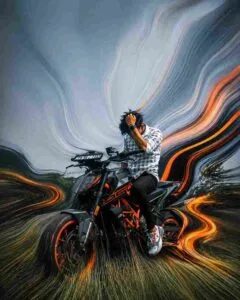
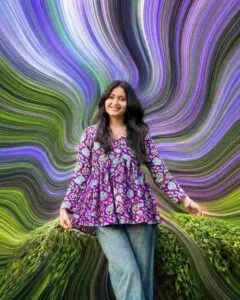
Create Pixel Stretch Effect Ai Photo Using Chatgpt Prompts
Creating Stretch Effect AI Photos is now easier than ever. First of all choose a clear and good quality photo of yourself. Try to upload such a photo which should be of outdoor, in which the background should be of lush green plants or the sky, that is to say, it should be very colorful so that the Stretch Effect created in our background is created properly. After this, open ChatGPT and upload your photo. Now copy the Stretch Effect AI Photo Editing Prompt, paste it into ChatGPT and send it. Within no time, AI will analyze your photo and based on it will create an attractive digital artwork with Pixel Stretch Effect. Sometimes what happens is we use the right prompt and the right photo. Still our photo does not turn out to be of high quality. If you have such a problem, you can try changing some things in the prompt or recreating the photo. The more detailed and clear the prompt is, the better and more realistic the end result will look.
Final Thoughts
If you want to give your photos a different, modern and attractive look from ordinary photos. Then Stretch Effect AI Photo Editing is a great option for you. With the help of this technique, stunning digital artwork. A good AI prompt can create this without requiring any difficult photo editing skills. Your own photos At present, this type of photo editing is becoming very viral on social media. Especially on Instagram, so quickly share your normal looking photo by making it with Stretch effect. If you want to get even more attractive and premium Stretch Effect AI Photo Editing Prompts. Be sure to check out other Prompts available on this website. By choosing the right Prompt, you too can create stunning AI images. Moreover, In just minutes that instantly capture viewers’ attention.