
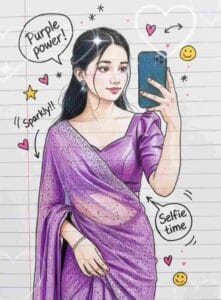
Google Gemini Notebook Sketch Ai Photo Editing Prompt – A few weeks ago, we told you about notebook drawing Ai photo editing and did you know that its alternative notebook drawing Ai photo editing is again going viral on Instagram in which people are creating and posting some different types of notebook drawing Ai photos. People are creating different types of photos using just one reference photo and uploading them to Instagram. Most of the photos going viral are of girls. In this trend, the photo is made to look like a hand-drawn sketch on a copy page. It’s also peppered with tiny doodles, text bubbles, stars, ribbons, and highlights throughout. This style has become quite popular among creators, photo editors, and students. This type of photo can be transformed into sketch-art from just a prompt without any editing or scale.
That’s why in this article we are going to give you a lot of prompts to create this type of photo.
Google Gemini Notebook Sketch Ai Photo Editing
Creating a Notebook Sketch with Google Gemini is very easy. All you need to do is upload a clear, high-quality photo of yourself. Then, enter the appropriate prompt. Gemini creates a complete image based on your photo, complete with notebook pages, colorful doodles, hand-drawn lines, marker borders, and sketchy shading. Whether it is a girl’s selfie photo or a boy’s, it will make every image look like a drawing in the same style. In this article, I’m sharing with you a variety of Notebook Sketch Ai prompts. Boy Girl Couple. Take a photo like this and upload it to Instagram as soon as possible. Because this kind of thing is causing a lot of havoc on Instagram. Gemini processes these photos so that the background turns into a paper-textured image, and words like Sparkle, Wow, Strategies, Shoot appear around the frame. Will create your stylish notebook sketch in minutes.
Gemini Notebook Sketch Prompt



How To Use Gemini Notebook Sketch Ai Photo Editing Prompt
The most important thing for creating any kind of photo with Gemini Ai is the prompt because without a prompt we cannot create a photo. We have provided you with various prompts to create photos related to the notebook sketch photo that is currently going viral on Instagram. We also showed you image samples that show which type of photo can be created with which prompt. Now we will tell you that once you get the prompt, how can you create any kind of photo by using it with your photo in Google Gemini.
- Open any browser on your phone.
- Type Google gemini in it and search.
- After the website opens, login with the help of your Gmail ID.
- 2.5 Select Flash and click on the plus below.
- Add a photo of yours by clicking on the gallery button.
- Enter the prompt we provide in the message box.
- Now click on the send button and wait for some time.
- Your photo will be ready in no time.
- Click on your photo to save it.
Conclusion
Google Gemini’s Notebook Sketch Ai photo editing trend has become one of the most popular styles on social media today. With just a photo and the right prompt, anyone can transform an ordinary photo into a creative, hand-drawn-like piece of artwork. Its biggest advantage is that it doesn’t require professional editing skills. Gemini automatically adds doodles, shading, notebook lines, and colorful highlights. We have given prompts to create various types of photos related to this, with the help of which photos can be easily created on this trend. The prompts in this article will help you make your photos more creative and attractive. Now just choose your favorite prompts, upload photos and create your own Notebook Sketch art in minutes.