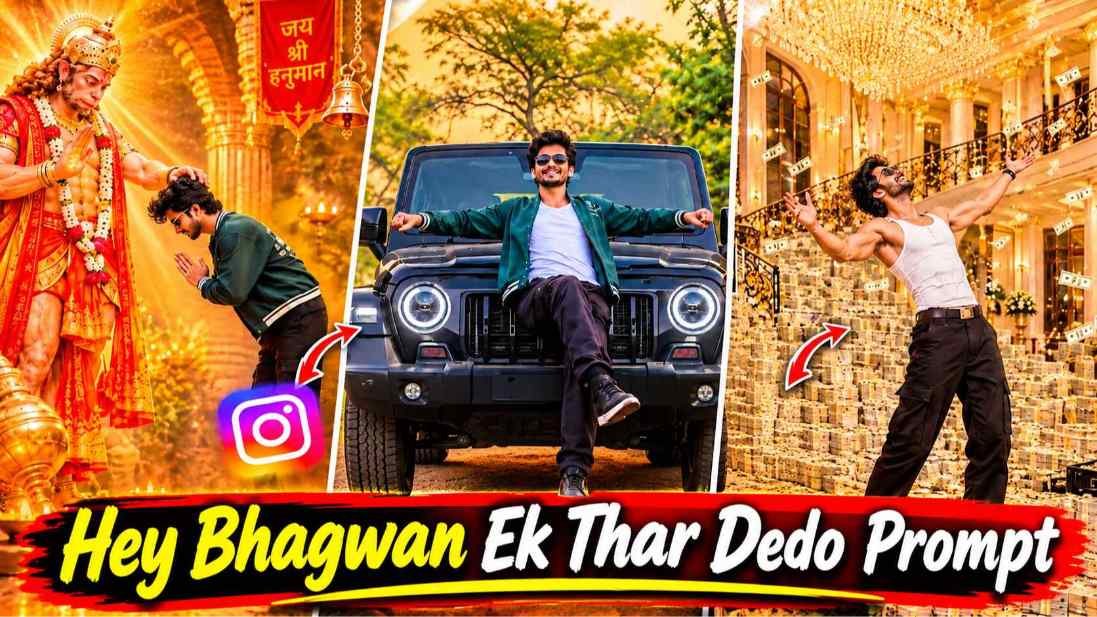
Hey Bhagwan Ek Thar Dedo – In recent times, you must have seen a video on social media in which people are asking God for their wishes. While acting, he keeps asking for various kinds of wishes. Be it a boy or a girl, everyone is following the trend these days and some people even record the video manually. Then they are making videos through editing apps, especially by using artificial intelligence, but at the same time we saw that some people are making such videos using a single photo. Those people who are making videos using photos, we saw what they do first. Take the reference video and after taking the reference video upload the video into artificial intelligence especially flow ai using a master prompt. Along with this, we also upload our photo and through the master prompt, we tell that using our photo, make a video exactly like the one we have uploaded and AI makes the video just by watching the video. Then later people edit everything like song, slow motion in the editing app and post it as per their own and soon everyone’s video gets a lot of views and likes.
If you are also thinking of making a video on that trend, then today I will tell you. How can you make that kind of video through reference video along with master prompt. In this article we will tell you everything about how to get the reference video. How to copy the prompt and after taking all the things how to make a video with your photo.
Hey Bhagwan Ek Thar Dedo Reels Editing
The making of this video started with the song ‘Hey Bhagwan Ek Thar De Do’. Whatever is said in the song, people make the video according to what is said in the beginning of the song. Oh God, people first record the video of folded hands and then fold their hands in front of God through the editing app. Then it is said in the song. If you give a Thar, the boy suddenly appears in front of the car, that too with a Thar, whatever is said in the song. People record the video accordingly and create photos through artificial intelligence. With that and then later through the editing app, we combine all the clips together and make the video by matching it according to the song. Before making such a video, you have to keep a good clear photo of yourself ready and only then make the video. We have given two reference videos, one for a boy and one for a girl, if you are a boy then use the boy’s reference video and if you are a girl then use the girl’s reference video. You can use two AI tools to make videos.
Edit Your Video With A Song
There will be no song in the video made by artificial intelligence. There will be a different kind of song. To edit the video with the kind of song you have created with Ai, first save the video. After the video is saved, add the video to any editing app and save the original video before Instagram or take the audio from anywhere, if possible I will give the song along with your reference video, then you can also take the song, what to do after that. Audio has to be added in the editing app and after playing the video, the video has to be matched according to the audio. If you want to do slow motion speed etc. then edit the video as per your requirement, if you want to cut it and apply transition effects, then apply that too and make the video in a good way. When you do this, your final video is ready. Now you can export and share the video wherever you want.
Refrance Video & Prompt

REFRANCE VIDEO
AI PROMPT
VIDEO CREATE
Make Hey Bhagwan Ek Thar Dedo Ai Video Using Prompt
See, in paragraph 4 we have given a button or text named Reference Video, click on it. Google Drive will open. You will get to see an audio along with two reference videos. Save all one by one. What to do now? Keep a photo of yourself ready. The photo should be such that your body is completely visible. It would be better if there is a full body photo. Now open the ai tool. Especially many people make videos using Flow Ai, so search by typing Flow Ai in any browser and click on the New Project option and select the video option first. Then select 9 ratio 16 and after making all the settings as per your requirement, click on the plus button at the top and click on upload to upload your photo along with the reference video. First select the video by clicking on the plus button at the bottom left side. Select the photo by clicking on plus again. Paste the same prompt in the chat box which is given in our website. Copy it from there and paste it here and directly click on send option.
After waiting for about one to two minutes, your video is created. If video is not made. Try again. After the video is made, play the video, watch it and save it.
Conclusion
In today’s article we talked about a new kind of video created by AI. In this article, we have talked about the video ‘Hey Bhagwan Ek Thar Dedo’ which is currently going viral on Instagram. How such a video can be made with the help of reference video. Complete information is given in this article. So please make such a video and watch it once. If there is any difficulty in making a video, you can watch our editing tutorial video either on Instagram. Otherwise you can watch it on YouTube.