Rain Season Ai Prompts – The months of July and August are going on and you probably know it. In this month, it rains everywhere, be it village or city. Whenever the rainy season comes, people start doing various types of editing on the rainy season. Be it a photo or a video. Right now the month of July is going on and the rainy season has also started gradually and what I have seen is that people have started doing different types of editing on the rainy season on social media. Some people are making photos and sharing them while some people are making videos and sharing them. A few years ago, when there was no AI, people would manually click their own photos to create photos on rainy season using PicsArt app and then add it to editing apps like PicsArt and create and share rainy season photos with the help of different types of backgrounds and PNG. But in today’s time, this is no longer the case, with the help of AI, people are easily creating any kind of photo with just their selfie photo and a right prompt.
In today’s article we are going to tell you about creating rainy photos with the help of AI. I will also share some AI prompts with you in this.
Detail Of Rain Season Ai Photo Editing
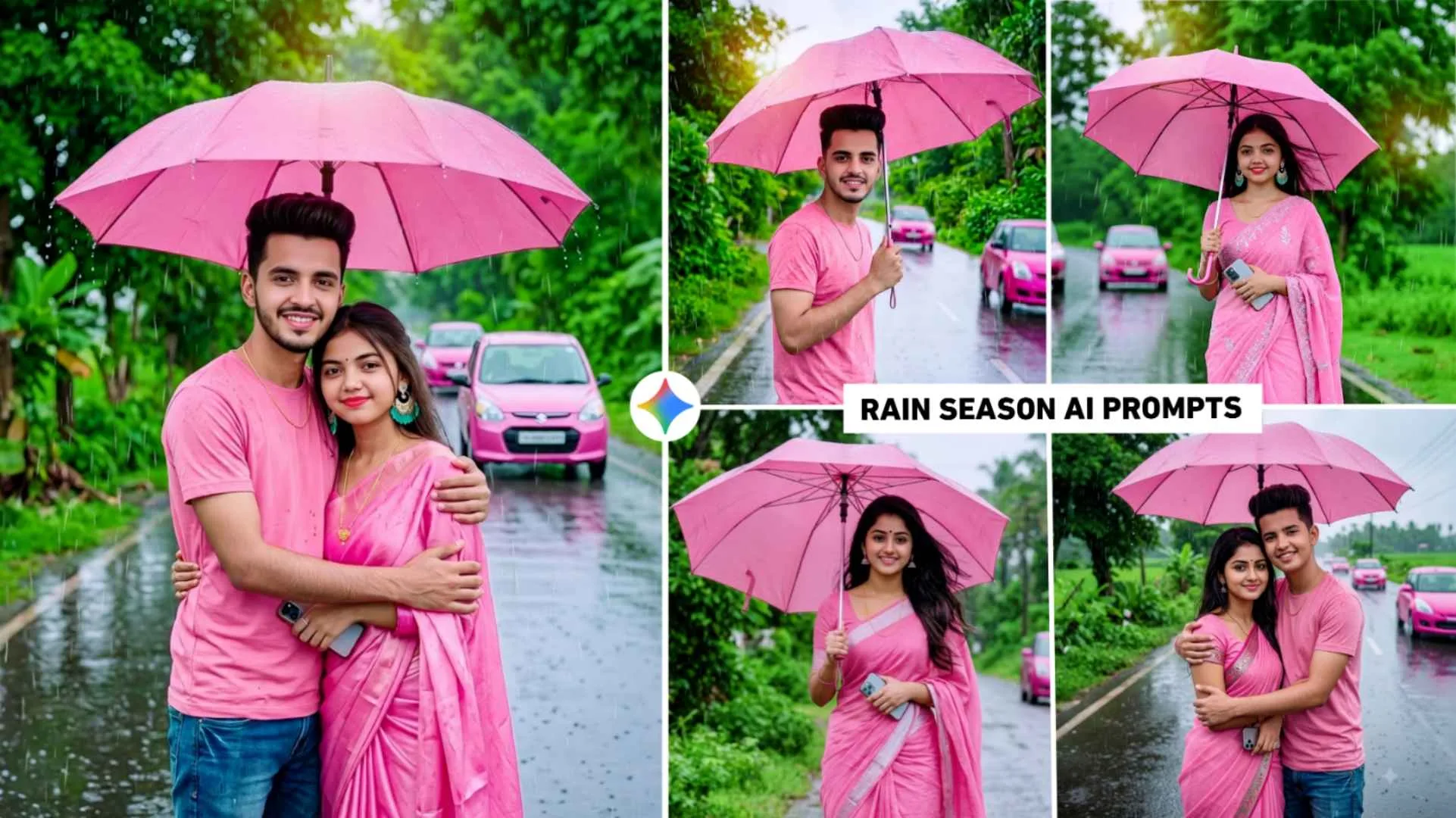
The photo of rainy season created by AI is currently trending on Instagram. But in this we will give a prompt to make a photo which no one would have made before today. In this article, we will share the prompt to make some unique rain photos for all, boys and girls couples, using which if you create your own photo, then you will see in it that you are walking on the road in a stylish pose holding a pink colored umbrella in the middle of an open road or you are somewhere in a stylish pose. In the picture, the boy or the girl or the couple are wearing blue colored jeans with a pink colored shirt. Talking about the background, a light sky is visible with every tree and plant in it and the road is completely wet. Two moving pink colored vehicles are also seen in the background. The rain drops that keep dripping from the sky are clearly visible in the photo. Along with this, some of its leaves are also seen on the road.
Rain Season Ai Photo To Video Editing
Yes, we can easily create videos using such photos through AI. For this you just have to decide what kind of video you want to make and prepare the prompt accordingly. After preparing the prompt, use an AI tool which has the facility to create video from images. There are some AI tools like Flow AI or Gemini. In which you can easily create a video with the help of images. Currently, the best results are being obtained from Flow Ai because our video is created with background music in it. That’s why if you are thinking of making a video using such photos, then use Flow Ai. But let me tell you that before making a video, make the photo as good as possible, because the better your photo is, the better the video will be. If you are not able to understand how to make your video and you are not getting a prompt for it, then you can upload your photo in chatgpt and take a prompt from them and say that w e need a prompt to make a video of such a photo.
Rain Season Ai Prompts

Use the uploaded selfie as the exact face reference for the boy and the uploaded girl photo as her face reference. Create an ultra-realistic DSLR-style 16K 2:3 half-body portrait of the couple lovingly embracing under a pink umbrella on a rainy road. The boy wears a stylish pink T-shirt, blue jeans, and a thin chain. The girl wears a modern pink saree, holds a smartphone, has open styled hair, earrings, a thin chain, a black bindi, light makeup, and smiles at the camera. Background: lush green trees, plants, fields, a wide wet road with reflections, multiple pink cars driving, very little sky visible. Visible raindrops, wet clothes and umbrella, soft overcast lighting, cinematic composition, shallow depth of field, HDR, vibrant colors, natural skin texture, ultra-sharp focus, masterpiece quality, no CGI, no cartoons, no illustrations.

Ai Photo Editing Prompts

How To Create Rain Season Ai Photo Using Gemini Prompts?
No matter what kind of photo you take with Ai, but before that you should always keep three things in mind, first keep the selfie photo of good quality, second use good and powerful prompts and third use Ai Tools. In this, I am going to tell you about making rainy season photos with the help of Gemini.
- Install the Gemini app from the Play Store or App Store.
- Open the app and login with your Gmail ID.
- Now click on the plus option and select the create image option.
- Click on the plus option again and this time click on the photo option. Add one of your high quality photos.
- Paste the copied prompt inside the chat box and click on the send button.
- After clicking the send button, wait a moment. Your photo will becreated.
- After the photo is created, click on your photo once and save it with the help of the save button.
Conclusion
Today’s article will be very useful for those who like editing on the rainy season because. In this article we have shared a prompt to make a different kind of unique photo for everyone, boy or girl couple. On the rainy season. So with the help of the given Rain Season Ai prompts. You too can create such a viral picture and post it on social media, especially Instagram. Moreover, There are some problems in making photos. You can definitely ask us in the comment box.