Cinematic & Aesthetic Ai Prompts – In the era of AI, there will be only a few people who click their photos. Also you must be using an editing app to edit it. Because everyone likes to take pictures and share them on social media like Instagram and Facebook. Often people now do not like to click pictures at new places. There will be only a few people who click their photos. Otherwise everyone wants to create the same picture with the help of AI. You can make that too with the help of just a selfie photo and the right prompt. In the matter of creating photos with AI, there are two such AI tools which are very popular. The first is Google Gemini and the second is Chatgpt. With the help of these two AI tools, people can create and share photos as per their wish. You must have often seen that people keep creating and sharing new types of photos. Every day, Chatgpt and Gemini keep becoming very viral. Therefore, in today’s article, we are going to share some cinematic and aesthetic photo prompts created with the help of Gemini and Chatgpt.
Breakdown Of Cinematic & Aesthetic Ai Photo Editing
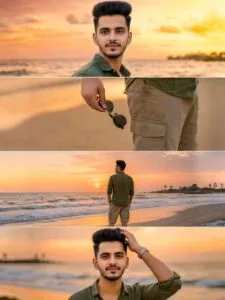
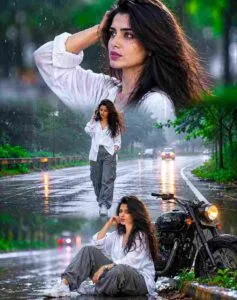
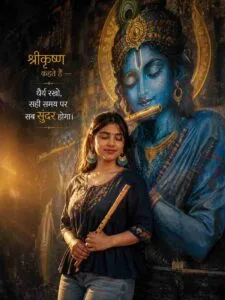
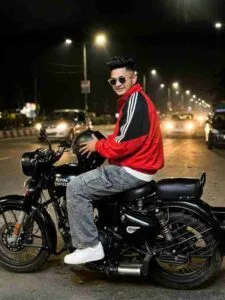
The reason people are so interested in creating aesthetic and cinematic photos is to give the photo. A story, mood, or movie-like feel. Moreover, in this style colors lighting and textures are used in such a way that they evoke emotions. Create a deeper connection with the viewer. In this prompt that we have shared with you to make cinematic and aesthetic photos, all types of photos are already viral on Instagram. Be it for a girl, a couple or a boy. The prompt for making photos that will be shared in this will be something like Sunset Beach Ai Photo, 3 Layer Rainy Road Ai Photo, Double Exposure Ai Photo. Vertical Triptych Collage Ai Photo and there are many such photos whose prompt will be shared in this. In paragraph four, you will be shown about four to five types of photos and a prompt. Will be given in a box just below them. With the help of which photos can be made. Apart from that, if you want a prompt to make more photos, then I have given the WhatsApp channel link in paragraph four itself.
By clicking on which you can take the prompt from the WhatsApp channel itself. We have shared reference photos with all the prompts. So that we can get an idea of which type of photo can be made with which prompt. So that it becomes easier to copy the prompt.
Common Mistakes To Avoid When Using Ai Prompts
When someone gets the prompt, he makes some mistakes while making the photo due to. Which AI is not able to give him the perfect result. The biggest mistake is writing a prompt that is too short or incomplete. Now, as per the rules, I have given you a prompt by making a box in this article. You have copied only some parts of the prompt and left the remaining text unchanged. If you copy only a part of the prompt, Chatgpt will consider it a half-finished prompt. Another common mistake is that people do not provide clear instructions about maintaining their photo identity (Face Identity). That is to say, even if you upload a selfie photo, your face may not be visible properly in the AI tool. Additionally, many people add multiple effects and different commands to a single prompt. This can confuse the AI and make the photo result look unnatural. It is better to keep the prompt simple, clear and objective. If you avoid these mistakes, your AI edited photos can look more professional, attractive, and worthy of going viral on Instagram.
Cinematic & Aesthetic Ai Prompts
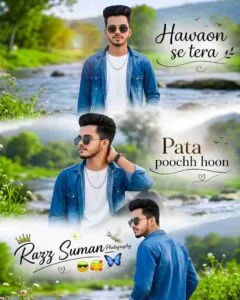
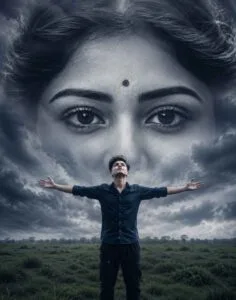
Cinematic Ai Photo Prompt
Aesthetic Photo Prompt
Create Cinematic & Aesthetic Ai Photo Using Prompts
Once you get the prompt, creating photos using AI tools is very easy. You just have to decide which AI tool you want to create photos with. If you want to create a photo through Chatgpt or Gemini, then you can create a photo from their website or with the help of the App. Similarly, it is the same in Gemini also. That is why I am going to tell you about making photos from both.
1. Chatgpt – First, open the Google Play Store and search for ChatGPT. Next, you will see the ChatGPT application in the search results. Then, install the app and, once the installation is complete, tap the Open button. After that, sign in using your Gmail ID. Finally, you can start using ChatGPT and access its features. Then select Create Image option and add your selfie photo with the help of Media option. Now, ChatGPT will create the photo according to the prompt provided in the chat box. Copy the prompt and paste it in the chat box and click on the send icon and wait for a while. chatgpt will create your photo.
2. Gemini – First, install the Gemini app from the Play Store and sign in to your account. Next, open the app and select the Create Image option. Then, enter the Cinematic & Aesthetic Ai Prompts you want to use and upload your selfie photo. After that, tap the Send button. Finally, wait a few moments while Gemini processes your request, and your AI-generated photo will be ready. If you don’t get better results then try making the photo two to three times.
Last Word
Today’s ai photo editing article cinematic will be more useful for those. who are very fond of aesthetic and cinematic & Aesthetic Ai Prompts. Because in this article some excellent prompts for making aesthetic and cinematic photos have been shared. Also create photos with AI or say Yu. What things should be kept in mind while creating photos with the help of prompt so that AI creates our perfect photo. Information about this has also been given. Some prompts have been shared on the website itself. We have also shared some prompts on our WhatsApp channel, so you can easily copy them directly from the channel.