Instagram Viral Cinematic & Aesthetic Ai Editing Prompts | Chatgpt & Gemini

Instagram Viral Cinematic & Aesthetic Ai Editing Prompts | Chatgpt & Gemini

Ai Photo Editing

Cinematic & Aesthetic Ai Prompts – In the era of AI, there will be only a few people who click their photos. Also you must be using an editing app to edit it. Because everyone likes to take pictures and share them on social media like Instagram and Facebook. Often people now do not like to click pictures at new places. There will be only a few people who click their photos. Otherwise everyone wants to create the same picture with the help of AI. You can make that too with the help of just a selfie photo and the right prompt. In the matter of creating photos with AI, there are two such AI tools which are very popular. The first is Google Gemini and the second is Chatgpt. With the help of these two AI tools, people can create and share photos as per their wish. You must have often seen that people keep creating and sharing new types of photos. Every day, Chatgpt and Gemini keep becoming very viral. Therefore, in today’s article, we are going to share some cinematic and aesthetic photo prompts created with the help of Gemini and Chatgpt.

Breakdown Of Cinematic & Aesthetic Ai Photo Editing

The reason people are so interested in creating aesthetic and cinematic photos is to give the photo. A story, mood, or movie-like feel. Moreover, in this style colors lighting and textures are used in such a way that they evoke emotions. Create a deeper connection with the viewer.  In this prompt that we have shared with you to make cinematic and aesthetic photos, all types of photos are already viral on Instagram. Be it for a girl, a couple or a boy. The prompt for making photos that will be shared in this will be something like Sunset Beach Ai Photo, 3 Layer Rainy Road Ai Photo, Double Exposure Ai Photo. Vertical Triptych Collage Ai Photo and there are many such photos whose prompt will be shared in this. In paragraph four, you will be shown about four to five types of photos and a prompt. Will be given in a box just below them. With the help of which photos can be made. Apart from that, if you want a prompt to make more photos, then I have given the WhatsApp channel link in paragraph four itself.

By clicking on which you can take the prompt from the WhatsApp channel itself. We have shared reference photos with all the prompts. So that we can get an idea of which type of photo can be made with which prompt. So that it becomes easier to copy the prompt.

LATEST AI PHOTO PROMPTS

Common Mistakes To Avoid When Using Ai Prompts

When someone gets the prompt, he makes some mistakes while making the photo due to. Which AI is not able to give him the perfect result. The biggest mistake is writing a prompt that is too short or incomplete. Now, as per the rules, I have given you a prompt by making a box in this article. You have copied only some parts of the prompt and left the remaining text unchanged. If you copy only a part of the prompt, Chatgpt will consider it a half-finished prompt. Another common mistake is that people do not provide clear instructions about maintaining their photo identity (Face Identity). That is to say, even if you upload a selfie photo, your face may not be visible properly in the AI tool. Additionally, many people add multiple effects and different commands to a single prompt. This can confuse the AI and make the photo result look unnatural. It is better to keep the prompt simple, clear and objective. If you avoid these mistakes, your AI edited photos can look more professional, attractive, and worthy of going viral on Instagram.

Cinematic & Aesthetic Ai Prompts
Cinematic Ai Photo Editing Prompts

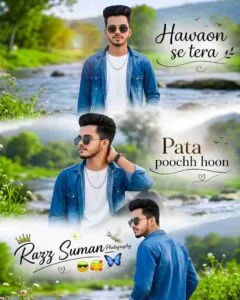
Use the uploaded image as an exact face reference, preserving identity 100% (same face, beard, hairstyle, skin tone, features, no beautification). Create an ultra-realistic DSLR cinematic 3-panel vertical poster (1080×1350). Same man in blue denim jacket, white t-shirt, black sunglasses, silver chain. Scenic rocky river, green trees, hills, flowers, natural daylight. Top: standing near river facing camera. Middle: stylish side-view close-up with soft mist. Bottom: back-view looking over shoulder. Seamless fog-blended composition, no frames, borders, or grid. Elegant black calligraphy text: “Hawaon se tera” (top right), “Pata poochh hoon” (middle right), “Your Name.” (bottom left) with crown. Add decorative swirls and flying black birds. Premium Instagram editing style, vibrant Lightroom colors, cinematic DOF, ultra-sharp DSLR quality, realistic skin texture, natural lighting. Text must be perfectly readable and correctly spelled. Negative: frame, border, watermark, logo, cartoon, painting, blurry/distorted face, extra fingers, duplicate person, low quality, incorrect text.

Chatgpt Cinematic Photo Prompt
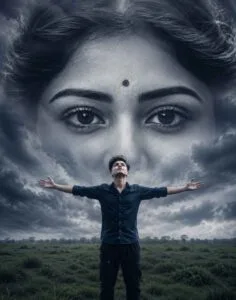
Use the uploaded image as the exact face reference and preserve facial identity 100%. Create a surreal cinematic digital artwork of a lone young man standing in a vast green grass field under a dramatic overcast sky, wearing a dark navy shirt and loose dark pants, arms fully outstretched, head tilted upward, expressing freedom and emotional surrender. Behind him, an enormous monochrome female face made from storm clouds dominates the sky, seamlessly blended into the clouds. Focus on ultra-detailed expressive eyes looking forward with deep melancholy, realistic eyelashes, eyebrows, skin texture, eye reflections, and a small black bindi. Ethereal ghostly appearance, dreamlike atmosphere, volumetric clouds, subtle fog, dramatic depth, moody cinematic lighting, dark blue-gray color grading, fantasy realism, ultra-realistic, masterpiece, 8K.

Cinematic Ai Photo Prompt

Sunset Beach Ai Prompt
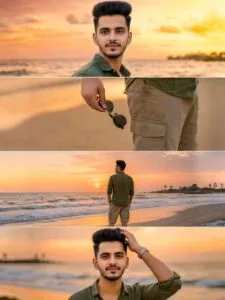
Use the uploaded image as a perfect face reference (no alterations to the face, skin tone, or identity). Create an ultra-realistic 3-panel vertical (9:16) beach sunset photoshoot. Beach shore, gentle waves, orange-pink sky, sun near the horizon. Same outfit in all panels: olive green linen shirt, beige cargo shorts, and a silver watch.                        Panel 1: A medium-sized cinematic shot of a man standing near the beach, looking towards the sunset horizon, calm expression, ocean waves behind, soft warm sunlight reflected on the face. Back pose, looking over the shoulder at the camera.                      Panel 2: A close-up aesthetic shot of a hand holding black sunglasses next to the pocket of the shorts, silver watch visible, shallow depth of field, beach background with smooth bokeh.  3: Standing on the beach, facing the sunset, a back view, relaxed pose, cinematic framing, golden light reflecting off the wet sand.                           4: Touching hair, natural and relaxed pose with a slight smile, warm glow of sunset on skin, effect of hair blowing in the wind, dreamy cinematic atmosphere. Natural skin texture, candid cinematic, no over-editing. Use the perfect layout of the reference collage: 4 horizontal full-width stacked strips (not a grid, not square panels).

Aesthetic Ai Photo Prompt
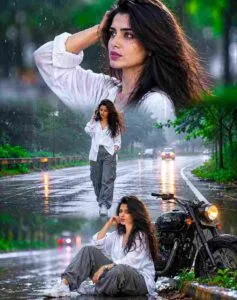
Use the person from the reference photo as the main subject. Keep their exact facial features, hairstyle, skin tone, and expression perfectly unchanged preserve all realism, emotional depth, and subtle facial lighting. Allow changes only in camera position, background motion, outfit and atmosphere. brown skin, Create ultra-premium rainy road cinematic collage in vertical 4:6 ratio with three emotional frames during bright overcast daylight after rain. Same exact face in all frames.Wear white oversized shirt, grey cargo pants and sneakers. Top frame looking upward at sky with raindrops on face, middle frame walking alone on wet road, bottom frame sitting beside bike thoughtfully. Bright reflective wet road, green trees, foggy atmosphere, glowing road reflections, realistic rain particles, cinematic puddles, Accept Ractio 4:6.

Aesthetic Photo Prompt

Lord Krishna Ai Prompt
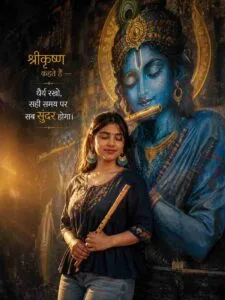
Ultra-realistic cinematic portrait of a young South Asian woman standing beside a giant blue Lord Krishna mural, eyes closed, holding a wooden flute, wearing an oversized navy-blue trendy short kurti with light-wash jeans, warm golden sunset backlight, ethereal glow, dark textured wall, spiritual devotional vibe, grainy 90s film aesthetic, realistic street photography, elegant Hindi typography on left side saying — “श्रीकृष्ण कहते हैं — धैर्य रखो, सही समय पर सब सुंदर होगा।”stylish golden and white font, balanced composition, text not covering the girl, ultra-detailed, 9:16 vertical.

Bullet Bike Ai Prompt
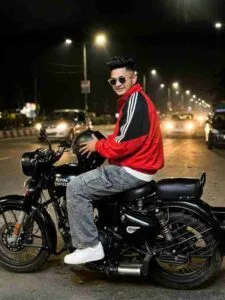
Use the uploaded image as exact face reference, preserve facial identity 100%. Realistic handheld smartphone night photo of the same boy sitting sideways on a black Royal Enfield Classic parked on an empty urban roadside. Slightly leaning forward, holding a black glossy helmet with both hands near the fuel tank, looking back over his shoulder. Oversized red-black tracksuit jacket half-zipped over a white T-shirt, baggy gray jeans, white sneakers. Messy textured hair, soft streetlight glow, cinematic low-light mood, realistic skin details, subtle bike reflections, slight motion blur, grainy smartphone camera look, candid unposed street photography, dim city lights background, aesthetic urban fashion vibe, ultra-realistic.

  More ai prompts

Create Cinematic & Aesthetic Ai Photo Using Prompts

Once you get the prompt, creating photos using AI tools is very easy. You just have to decide which AI tool you want to create photos with. If you want to create a photo through Chatgpt or Gemini, then you can create a photo from their website or with the help of the App. Similarly, it is the same in Gemini also. That is why I am going to tell you about making photos from both.

1. Chatgpt –  First, open the Google Play Store and search for ChatGPT. Next, you will see the ChatGPT application in the search results. Then, install the app and, once the installation is complete, tap the Open button. After that, sign in using your Gmail ID. Finally, you can start using ChatGPT and access its features. Then select Create Image option and add your selfie photo with the help of Media option. Now, ChatGPT will create the photo according to the prompt provided in the chat box. Copy the prompt and paste it in the chat box and click on the send icon and wait for a while. chatgpt will create your photo.

2. Gemini – First, install the Gemini app from the Play Store and sign in to your account. Next, open the app and select the Create Image option. Then, enter the Cinematic & Aesthetic Ai Prompts you want to use and upload your selfie photo. After that, tap the Send button. Finally, wait a few moments while Gemini processes your request, and your AI-generated photo will be ready. If you don’t get better results then try making the photo two to three times.

DOUBLE EXPOSURE PROMPTS

Last Word

Today’s ai photo editing article cinematic will be more useful for those. who are very fond of aesthetic and cinematic & Aesthetic Ai Prompts. Because in this article some excellent prompts for making aesthetic and cinematic photos have been shared. Also create photos with AI or say Yu. What things should be kept in mind while creating photos with the help of prompt so that AI creates our perfect photo. Information about this has also been given. Some prompts have been shared on the website itself. We have also shared some prompts on our WhatsApp channel, so you can easily copy them directly from the channel.

WhatsApp Group Join Now
Telegram Group Join Now

Leave a Reply

Your email address will not be published. Required fields are marked *