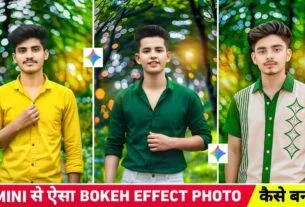
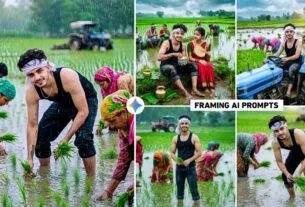
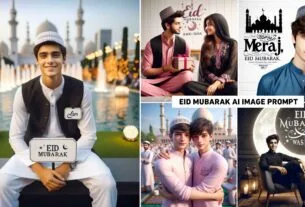
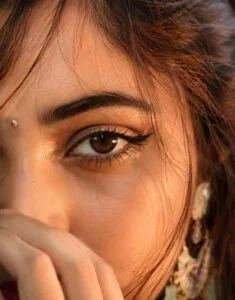
Close-Up Eyes Girl Ai Prompt – If you have used Instagram recently, you must have seen such a photo of girls with close-up eyes. From the looks of it, it would appear that the photo must have been clicked with a larger camera. That too by using a big lens so that the entire focus is near the girl’s eyes and eyebrows. You must have seen in the pictures that a large part of the face is not visible. Rather, the entire focus of the camera is on the eyes, eyebrows and a small part of the face. Such pictures are becoming very viral on social media at the moment, many people are knowing such pictures by the name Golden Hour Close-Up Eyes Girl AI Photo Editing. When someone sees these viral photos for the first time, they might feel that this photo must have been clicked in some expensive room with a big lens, but let me tell you. This picture has not been clicked in any kind of room or professional studio. As far as I know, people are creating these viral pictures through AI with just a selfie photo. So now it has become everyone’s first choice.
Complete Information Close-Up Eyes Girl Ai Photo Editing
This is what you’ll see in the viral Closeup Eyes photo taken by Ai. In this, the entire attention of the camera remains focused on the beauty of the eyes, the natural structure of the face and the effect of light. This is why the first glance of the viewer goes directly to the eyes. In the picture you will see the effect of golden hour i.e. the light golden light of sunrise or sunset is visible on the face. The skin color is kept natural. Apart from this, light flying hair on the face, deep and clear eyebrows, attractive eyeliner, natural eyelashes and shine in the eyes are the biggest features of this style. If you upload a good quality selfie of yourself in Ai Tools and create a photo, the resulting photo looks very similar to your real face. This is the reason why this photo style has become very popular at present for Instagram Reels, Profile Picture, Display Picture and Social Media Posts. If you also want to create such a picture that goes viral on social media, then this article will prove to be very useful for you.
Customize Ai Photo Editing Prompts
Look friends, in this we have shared the prompt to make Golden Hour Close-Up Eyes Girl AI photo. We have also shared the prompt to make both left side and right side close-up photos. If you want our photo to be made in a different way. Then you can make the photo as per your wish by making. Some changes in the given prompt. Like you can make a full face photo. For this, just copy and paste the prompt given in Notepad and make any photo you want. You can customize the photo by changing the text as per your choice. If you are not able to change the prompt and still want to create a photo, then copy the given prompt and put it in any AI tool like Chatgpt and Gemini to create any photo you want. By writing the text accordingly, you can get the prompt with the help of AI. Apart from this, if you are thinking of making. Any other kind of photo similar to the photo which is going viral now.
So by uploading the same photo in chatgpt or Gemini, you can tell them that. I want to create another photo similar to this one for which I need a prompt. Then chatgpt or gemini will give you more prompts. With the help of which you can create different style photos and share them on social media.
Close-Up Eyes Girl Ai Prompt
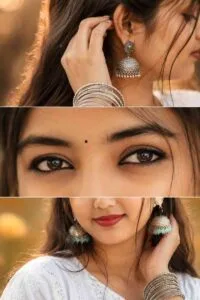
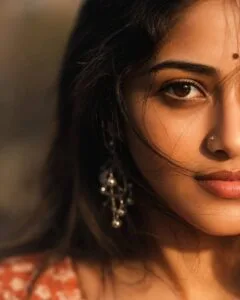
Make Close-Up Eyes Girl Ai Using Chatgpt Prompt
Creating that kind of viral photo is extremely easy. First of all, choose a clear and good quality selfie of yourself, in which your face is clearly visible. After this, open ChatGPT, Gemini or any AI Image Generator which allows creating photos based on reference image. I have seen that many people are creating such viral pictures with the help of chatgpt. So install the chatgpt app from Google Play Store, open it and login with the help of Gmail ID. After logging in, first select the Create Image option. Then upload your reference photo with the help of the media option and paste the prompt. Given inside the chat box and then click on the send button. chatgpt will create your photo and give it within some time. When your perfect photo is made then click on your photo. If AI does not create the perfect photo. Then try making the photo once or twice. After AI creates the photo, click on your photo and save it. In the gallery with the help of save button. Before sharing it on Instagram. Make that photo even better through any editing app. Like adjusting lighting, color grading etc.
Important Information
If you are creating and sharing any content on social media with the help of AI. Then keep one thing in mind that you must mention in the caption. AI created this video or photo. Misusing another person’s image, identity or content with the help of AI may be inappropriate. In many cases, a violation of the law. So only use your own photo. The photo of a person for whom you have explicit permission.