Paddy Farming Ai Photo Prompts – People who are farmer brothers or sons of farmers often do farming. Today’s article is going to be very special for them. Because right now June-July monsoon season is going on which falls in Kharif crop. You must know. You must have often seen this in the village as soon as the monsoon season starts. That is, when the months of July and August begin, farmer brothers often plant paddy in their fields. In the previous article, we had shared with you some prompts for making photos with AI during the rainy season i.e. monsoon season. Using which the photo was made. In today’s article, we are going to tell you all about doing AI photo editing on the paddy crop grown in Kharif crop. How do farmer brothers plant the paddy crop? In this article, we are going to share with you a prompt to create all types of photos, using AI tools like Gemini, you can easily create a photo of sowing paddy crop with your real face.
Detail Of Paddy Farming Ai Photo & Prompts
In this we will give you a prompt to create a photo with as much AI as possible. Everything will be related to the paddy crop, how people in the village do it while growing the crop, and how they grow it. You will see all this in the picture. As you’ll see when you create your own photo using the photo prompt we provided for the first photo. You are sowing paddy plants in water and some other people are also involved in it along with you. There is a scene of rainy season with fields all around and a tractor in the background. Talking about your outfit, you are wearing a black vest and black pants. He also keeps a white towel wrapped around his forehead. Exactly similar to this, the second and third as well as the fourth picture will also be related to this. In some pictures you will be seen driving a tractor and in some pictures you will be seen sitting on the side of the field and eating food. I have also shown a reference photo along with the prompt.
So that if you want to make a single photo, you can easily copy the prompt by looking at the photo. An important information is to create the picture using all the prompts in Gemini only. Because I have created the entire picture in Gemini only, that is why I have got such better results.
Tips To Improve Your Photos
Look, the color grading in the photo that Gemini creates is a little less. Meaning the photo looks a little faded. If we do color editing in that photo through Lightroom app or any kind of editing app like making the background green. Adding sparkle to your outfit, smoothening the face a bit plus whitening it. After doing these small things, our photos start looking of better quality, so for this you can use Lightroom app. Whatever photo I have shown in this article. After making all of them with Gemini, color grading was definitely done with Lightroom app. That’s why the photo looks so good. If you are not able to edit photos manually with Lightroom app, then Lightroom app also comes with presets with the help of which you can do color grading in any type of photo in one click. But believe me, you should make color adjustments in the photo as per your requirement so that color grading is done as per requirement.
Paddy Farming Ai Photo Prompts
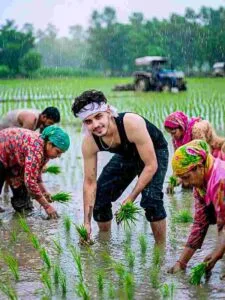

Paddy Farming Prompts
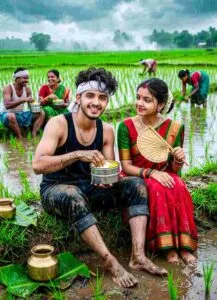
Make Paddy Farming Ai Photo Prompts Step By Step
As we said, all the photos you will be seeing in this article have been made using Gemini only. If you want our face to look absolutely real in the created picture, then you can create the picture using such a photo in which the face is visible perfectly. There should not be any kind of mask, cap etc. on the face. Let me tell you step by step how to make a selfie in Gemini with a photo and prompt.
- First of all install Gemini App from Play Store.
- After installation, open the app.
- Click on Plus at the bottom and select Create Image Option.
- Click on the plus option again and this time add your selfie photo with the help of the image option.
- After adding the photo, enter the copied prompt inside the chat box and click on the send button.
- After clicking the send button, wait for some time. Until the photo is made.
- After the photo is created, click on your photo and save it.
Overall
Recently, those who have seen a picture of planting paddy on Instagram must have seen it. People who are thinking of making such a picture and are looking for prompts related to it. Today’s article is going to be very useful for them. In this article, prompts of all the pictures which are currently going viral on Instagram have been shared. So make sure to take a photo with the help of the given prompt. If there is any problem in making the photo. If not on Instagram, then by joining us on YouTube, you can learn to make such photos by watching some editing videos related to this photo editing.